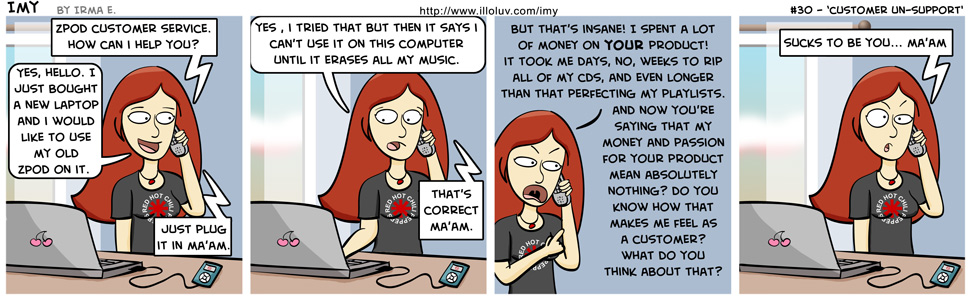


30 – Customer Un-Support
Just to clear things up, for those who DON’T KNOW, there are a few models of iPod that DO NOT allow manual sync. Like the shuffle (maybe it’s only the shuffle, I don’t know for sure). Maybe the newest version doesn’t allow this, I don’t know. But the shuffle I have ONLY autosyncs. So if you hook it up to a new computer it won’t work with that computer unless you erase it (if you already have all the music on the new computer then it obviously doesn’t matter, but if yo don’t have that music saved, then you’re screwed.). Most iPods allow for manual syncing though, which the above does not apply to.
Basically, I’ve come to realize how some companies completely crap on their customers. I think that shines through on this strip 😀
I’m so happy I still just love to buy CDs.

CD’s are awesome! It’s all about the insert! 😀
This is pretty much how it’s been dealing with the airlines this week too.
SO true.
Van Halen….Chili Peppers…Imy has good taste in music.
I thought she was getting a pink one! Or is it just the cherries that change colors? That’s why I quit working customer service – they wouldn’t let me talk to customers like that. Great expression at the end.
Grammar notes: it’s “ma’am” with 2 a’s. Don’t want you looking like you got a public education now, do we? Oh, and in panel 3 the second line reads “of money your YOUR product!” I assume it’s “on YOUR product!”? See to it that it doesn’t happen again. 🙂
Luna: Hehe! I have a bookcase with about 1000 CDs in it. We’re going ot need a new one soon. I love my CDs. It’s a collection.
Heather: Yikes! You’ll have to tell me more about that later.
Scott: Ahhh, yes. She learned from the best of course 😉
me!: She was merely excited about the possibility of getting a pink one 🙂 Actually, I almost gave her a pink one, but I decided that after a while I would get sick of always drawing her a pink one. So I compromised, and put the pink cherries instead.
Ah yes, thanks for catching that. The “ma’am” was something I googled last night, and the spelling I put was the one I found in a few considerably legit places. But I’ve fixed it now. And I swear I never saw the double “your” thing. I read it over and over and over again. And never saw it. I had 3 other people check it and no one else saw it. Funny how that happens.
LOL, it IS a collection!!! I’m like that with my DVDs too! T wanted to put them all in one of those horrible binders… My foot was down in point 002 seconds! LMAO
In case you are curious, if you want to keep your music on said “zpod” you just can’t auto-sync it to the laptop 🙂 That’s how I have music from both my laptop and my desktop on mine at least.
Luna: NO! Not a binder! Binders = BLASPHEMY! I’ve seen others do that too… chills me to my very core…
Megan: Yes, but the newer “zpods” don’t allow you to connect to a new computer all unless you erase it. If you say “no” to erasing, then “zTunes” just refuse to recognize the “zpods”, and then you can’t move any music onto it at all.
I have 2 “zpods”. My big one is old enough that it was before this time. I never auto-sync and only manually manage my “zpods”. So that one wasn’t a problem. My other “zpod”, however, is much newer and that one had to be erased before I could use it on the new computer.
Of course there’s also the option of using something like Winamp to manage my “zpods”… but I’m skeptical…
*Snuggles his Pioneer Inno*
You won’t ever find a zpod, zphone or zlappy in our house. I’m tired of being treated like a …. criminal… The 3 minutes of FBI warnings at the beginning of each DVD still sickens me… 🙁
If you haven’t heard already there’s a program called Senuti that’s free that will transfer all of the music off of your zpod to your computer and import it into ztunes all in one go.
SOB SOB .. !! me in same state as well 🙁
Am I too late to the party?
Regardless of which iPod you have (not the iPhone or iTouch), you can get all of your music off of it without going through iTunes. If you open “My Computer”, you should see ***’s iPod. Open that up. If it looks blank, go (Tools ->Folder Options -> View -> Show Hidden Files and Folders). Open iPod Control, and then drag the Music folder to wherever on your computer you store your music, preferably in your iTunes music folder. Once it’s copied all the music over, in iTunes, go File -> Add Folder to Library. Blamo! 😀
Noah
p.s. But even with that available, your comic is still too close to truth to be anything but hilarious.
I moved my iTunes library from my old laptop to my new one a few months ago and had no problems with it. It involves exporting your library and putting the music in the same folder on your new computer that it was in on the old computer, then going into iTunes and doing “import library.” I plugged my iPod into the new computer and everything worked, it didn’t delete a single file.